ASRock AM5 CPU Failure Reports
Table of Contents
Background
AM5 CPUs exploding are not a rare sight anymore unfortunately and has been around for quite a while by now. Reports of AM5 processors suffering severe failures began in the Ryzen 7000 era (aka since 2023), when AMD and motherboard vendors responded to burn-damage incidents by capping SoC voltage through AGESA and board BIOS updates at 1.3V. In other words, buggy firmware which resulted in CPU death by over-voltage.
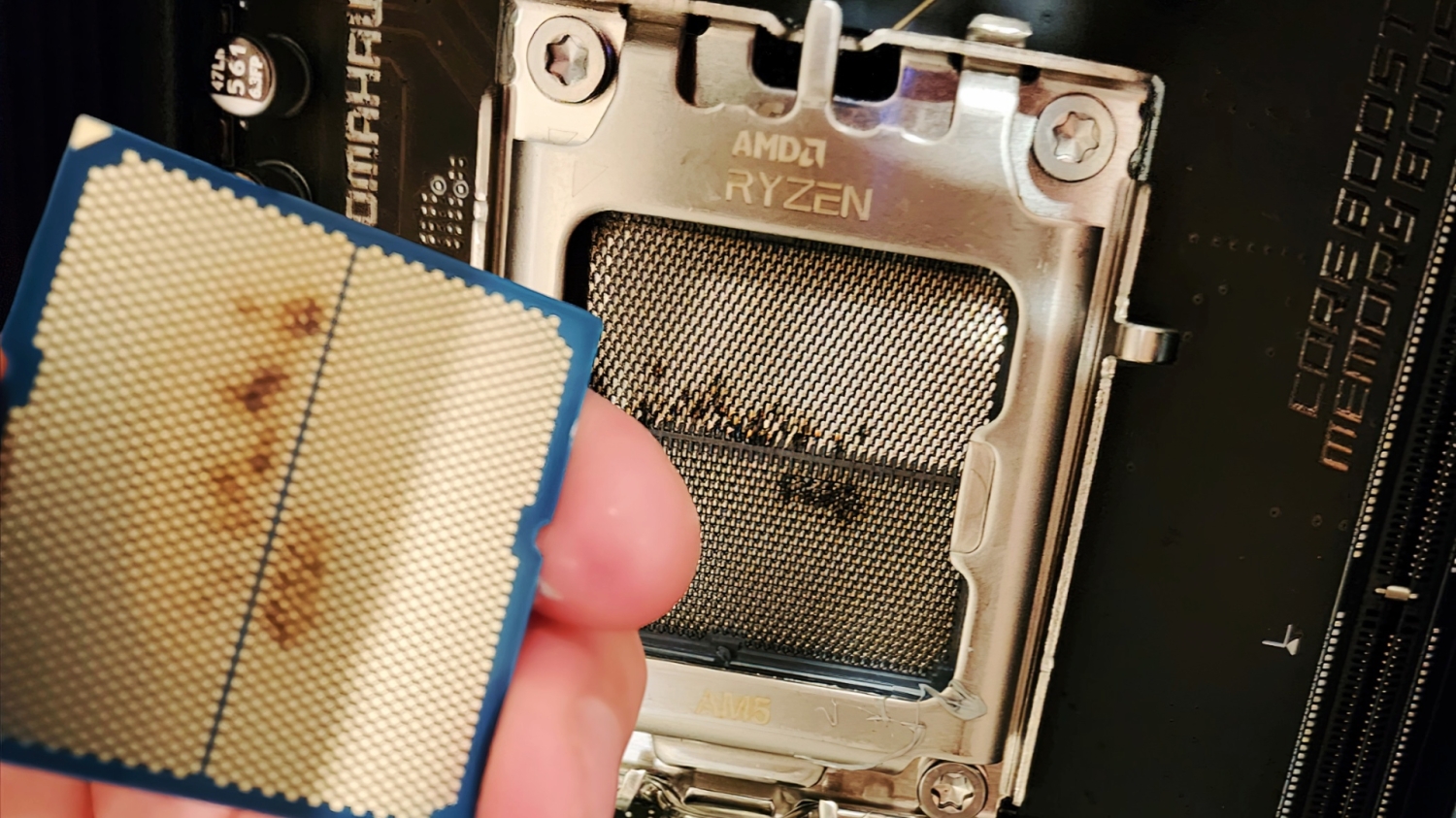
One would think this would have been solved by now, but apparently no. A later wave of CPU death emerged around the Ryzen 9000 release as well, especially around the 9800X3D. GamersNexus themselves have reported compiling a March 2025 sample of 42 dead 9800X3D CPUs, of which 34 on ASRock boards, 6 on ASUS, one on Gigabyte and one on MSI. The affected boards spanned across numerous chipsets of which 30 were X870s, 6 were B850s, 4 B650s, and 2 X670s.
The fact that multiple chipsets were affected means this isn’t a single chipset defect; this is a firmware issue potentially.
Initial symptoms were not dramatic nor immediate. According to numerous posts, forum threads and news articles, many of the systems apparently were running completely fine before failing suddenly, with the time period spanning anywhere from under an hour to potentially several months. Such failures often manifested themselves presenting a debug code (on motherboards that can present debug codes) that typically points to CPU initialization failure (otherwise solid CPU red for the debug LEDs present on most AM5 motherboards). Only a smaller subset of suh reports involved obvious burn marks or scorched contact areas.
This is interesting because it could mean at least two different classes of failure: systems that appear dead because they cannot boot (motherboard failure potentially as well), and systems that have incurred physical damage (burning via overvoltage or otherwise).
What exactly is happening?
The exact root cause still has not been fully established nor pinned down, but there are two extremely strong theories as to why this is happening. The strongest possibility at the moment, supported primarily by GamersNexus is that it could be due to BIOS-related boot and stability issues, with a second possibility (weaker but still plausible) of a potentially bad CPU batch.
Another key takeaway from the GamersNexus article was that some of the “dead” CPUs apparently came back to life by flashing to an older BIOS, or by using a special ASRock BIOS, which could point to the fact that at least part of the failure pool in fact was not because of permanent silicon death, but firmware-level instability, or even corrupted microcode which got cleared with the older AGESA update.
One possible mechanism of failure was that some 9800X3D samples were not receiving enough voltage to boot reliably under certain BIOS conditions, with some users on forums claiming that ASRock had provided a BIOS version that raised voltage to 1.2V to resolve a persistent “00” boot failure (CPU initialization failed). This matters because undervoltage instability and overvoltage damage are very different problems: too little voltage can stop a system from memory training or completing POST, whereas too much voltage or overly aggressive power/current behavior is more consistent with long-term degradation or visible electrical damage (as shown in the image above).
The overvoltage aspect seems to also be true for many boards as well, as many users on Reddit have also reported that their CPUs also started dying after several months or even years too (a small sample):
However the broader AM5 history seems to support the idea that board firmware policy is part of the story. AMD’s earlier response to the Ryzen 7000 burnout involved AGESA changes that limited SoC voltage, whereas ASUS published support guidance on the Ryzen 7000 AM5 boards and Gigabyte publicly stated its AM5 boards complied with the 1.3V SoC guideline. Those vendor and AMD responses do not prove every later AM5 failure was caused by overvoltage, but they do show that board-level implementation of AMD platform guidance had indeed been a considerable factor before.
Funnily enough, MSI never seemed to have had any widespread issue as ASUS and Gigabyte and out of all 4 vendors, MSI had been the most stable for most users (lack of complaints of CPU hardware failure featuring MSI boards). Note that this is not a recommendation for MSI boards, but just an observation.
ASRock’s later statements suggested that the Ryzen 9000 and X3D issue is not just a mere replay of the 2023 SoC voltage issue. In August 2025, ASRock said that BIOS 3.40 for AM5 boards changed Memory P-State defaults and adjusted VDDCR_SOC voltage parameters to improve memory compatibility and CPU stability cases from prior BIOS versions, which points to a potential mixed platform problem involving memory training behavior, SoC related tuning and board firmware decisions rather than just a single universal defect in the X3D models or singular chipset.
Vendors, chipsets, AGESA, and RAM overclocking
The public reporting so far suggests the problem is distributed across several AM5 chipsets rather than a singular X670E or a single tier. GamersNexus’ 42-case sample included boards of all kinds including X870s, B850s, B650s and X670s, with the heaviest concentration being the X870, not because that had the highest failure rate but rather because it was the most common buying pattern for higher end AM5 CPU owners at the time (such as the 9800X3D). In other words, we can’t assume that other boards like the X670 or B850s are safe as firmware policy can (and usually is) applied across generations.
Memory overclocking also remains a credible contributing variable, as AMD’s earlier AM5 burnout response alongside ASUS, Gigabyte’s and ASRocks press releases all reference to memory compatibility which tie platform stability to the interaction between BIOS/AGESA and DDR5 EXPO/DOCP/XMP or memory training behavior.
In simple terms, an unstable memory-controller or SoC training window can push vendors to tune voltages, timings, or training behavior more aggressively, which leads to edge cases that only appear within certain CPU samples, RAM kits, BIOS revisions, boards, or a combination of all 4.
Symptoms and Diagnosis
- “00” or “CPU initialization failure” debug code on a system that was known to work previously.
- May also manifest as repeated boot loops due to CPU initialization failure.
- Could actually be failed memory training or firmware instability.
- This sudden boot failure can also occur after days, weeks, months or even years of normal use.
- May also manifest as repeated boot loops due to CPU initialization failure.
- Failure to POST after a BIOS update.
- Instability instead could also occur, often concentrated around specific BIOS branches than all BIOS versions equally.
- Recovery can also potentially occur via BIOS flashback too.
- Burn marks, scorching, or visible damage on the CPU underside or in the socket area.
- This does occur for a smaller subset of cases, but still does occur to this day.
- Issues appearing with only certain RAM kits, memory settings or EXPO/DOCP/XMP enabled configurations.
- From reviewing forum posts, even RAM under QVL (Qualified Vendor List) are also affected.
- Normal operation with a different processor in the same motherboard after initial reported failure.
- Said “dead” CPU may also work in another motherboard too.
Potential Solutions
Due to the extremely varied nature of this issue, its extremely difficult to pin down one exact solution. Naturally if there is physical damage to the CPU or motherboard, an RMA should be requested immediately as there is no way to fix physical hardware damage.
Solution 1: BIOS Update (Mitigation)
First line mitigation is a BIOS strategy rather than immediate hardware replacement. AMD has previously addressed the AM5 voltage risk through AGESA limits, while other vendors also implemented their own patches accordingly to address the concerns. In all cases, updating to the latest non-beta BIOS is always highly recommended.
DO NOT USE BETA VERSIONS OF BIOS!
Do not use beta BIOS versions unless specified otherwise by the vendor as these versions can contain bugs or other firmware level defects that can cause instability or worse.
Solution 2: Running stock or more conservative settings
Running stock settings in BIOS can also potentially help reduce the risk while the issue still is relatively at large.
- Avoid utilizing EXPO and aggressive PBO behavior, and use stock (JEDEC) memory settings
- Potential consideration to also utilize mild undervolting to reduce thermals and stress on the system. (Not really recommended)
- Do note that this is not a universal fix for all AM5 boot/failure reports and may even end up worsening the marginal stability if the root problem was already insufficient voltage during memory training or startup!
If hardware failure is suspected
If a CPU is already suspected to be dead, diagnosis should begin with physical inspection and cross testing.
Inspect the socket on the motherboard as well as the underside of the CPU for any bulging or burn marks. If none are present, attempt booting the CPU in another compatible motherboard.
It is also advisable for the user to attempt a BIOS flashback or even use an older BIOS version if the system does not boot at all.
If hardware damage is seen (bulges or burns), the next step is to request an RMA (Return Merchandise Authorization) for both the motherboard and the CPU.
- ASRock RMA procedure for motherboards: ASRock Repair/RMA page
- AMD RMA procedure for CPUs: AMD Warranty Services
Note that for CPU damage, ASRock may be the primary contact for fixing the CPU as well as it is their product which damaged/destroyed the CPU.
Credits
- ASUS’s and Gigabyte’s initial statement for the 7000 series issues in 2023.
- ASRock press release for BIOS 3.40
- GamersNexus press release, Tom’s Hardware and TechPowerUp.
- A LOT of Reddit posts and other forum posts (Level1Techs, TechPowerUp forums, LTT forums, etc.)